Turn any YouTube video into Shorts, right from Chrome
Open a video on YouTube, click the Wow Cut Video icon and press Cut into shorts. AI finds the five strongest moments and cuts them into vertical clips with animated captions — while you keep watching.
Add to Chrome — it's free





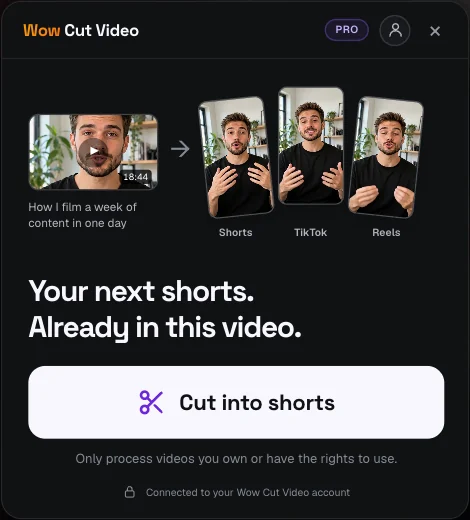
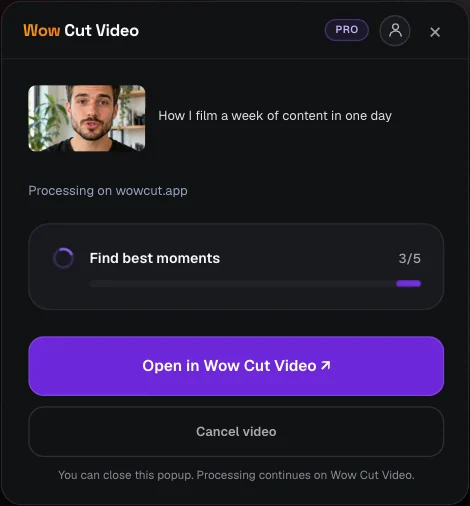
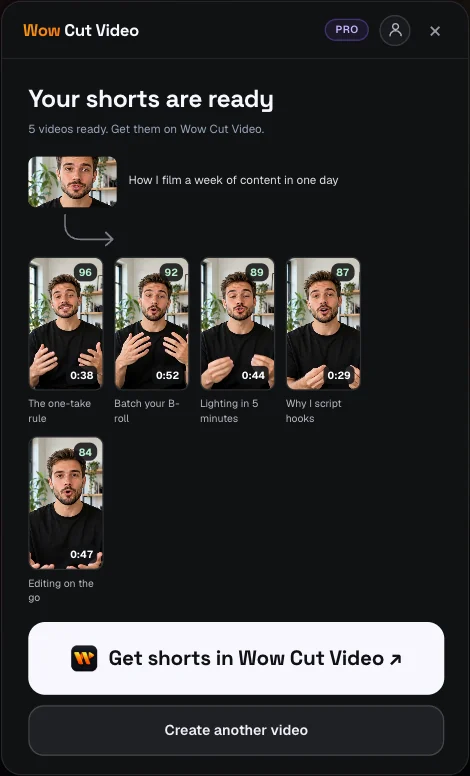
A real run on a real video
A 23-minute lecture went through the extension and came back as five ranked shorts, each with its own caption style. The moments, timecodes and scores in the video are what the AI returned.
Watch the original on YouTube ↗“How To Speak Like The 1% Elite” · Video by IELTS Advantage, used under CC BY.
How it works
- 1
Add the extension
Install Wow Cut Video from the Chrome Web Store and sign in with your Google account.
- 2
Click on a YouTube video
Open the video, click the extension icon and press Cut into shorts. The panel opens on top of the page.
- 3
Get five captioned shorts
Processing runs on our servers. When the moments are ready, review, restyle and export them in the Wow Cut Video editor.
No links, no uploads
The extension reads the video you are watching. Nothing to copy, nothing to download to your computer first.
Real moment detection
AI reads the whole transcript and picks complete, self-contained moments — hooks, answers and reactions, not fixed slices.
Vertical, with captions
Every moment becomes a 9:16 clip with word-by-word animated captions for Shorts, Reels and TikTok.
Keep browsing
Close the panel and come back later: the job keeps running on our servers and the panel shows where it stands.
Why a Chrome extension instead of a website
Most clip tools start the same way: copy the link, open another tab, paste it, wait. When you find a video worth clipping while you are already on YouTube, those steps are what stop you. The extension removes them — the button is next to the video.
The extension itself is small and stores nothing on your computer. It asks for access to the current tab only when you click it, reads the title and length of the video, and hands the job to Wow Cut Video. Downloading, transcription, moment detection and cutting all run on our servers.
The editor is still yours
The extension proposes the moments; you decide what gets published. Open the job on wowcut.app to move the start and end of every clip, fix misheard words, pick a caption style and change the framing before you export.
The same account works everywhere — the website, the Mac app and the extension share your plan and your history.
Frequently asked questions
Is the extension free?
Yes. Installing it is free, and the free Wow Cut Video plan includes a run to try it on your own video. PRO removes the limits. See current plans →
Which browsers does it work in?
Google Chrome and Chromium-based browsers that install extensions from the Chrome Web Store, such as Edge, Brave and Arc.
Does it download videos to my computer?
No. The video is processed on our servers, and the finished clips are available in your Wow Cut Video account.
Can I use it on any video?
It works on YouTube video pages. Only process videos you own or have the rights to use.
Do I need to keep the tab open?
No. You can close the panel or the tab — the job keeps running and you will find the result in the extension or on wowcut.app.
Your next Shorts are already in the video you're watching
Add the extension, open a YouTube video and click once.
Add to Chrome — it's free